


Let’s get real. We all want our websites to show up higher in Google, right? But SEO can feel like a giant, confusing puzzle.
Here’s a piece that makes it all simpler: Cloudflare.
Think of it as giving your website a major upgrade in two key areas Google cares about deeply: speed and security. When someone visits your site, Cloudflare helps it load in a blink, creating a smooth, frustration-free experience.
It also stands guard like a friendly bouncer, keeping the bad bots and security threats away.
This isn’t just about ticking technical boxes. It’s about showing Google that your site is fast, safe, and reliable, exactly the kind of place they want to send visitors.
So, while you still need great content and clean design, Cloudflare works quietly in the background to give your SEO a powerful, practical boost.
It’s not a magic trick, but it is a seriously smart move that makes your entire website work better for both people and search engines.
What Is Cloudflare?
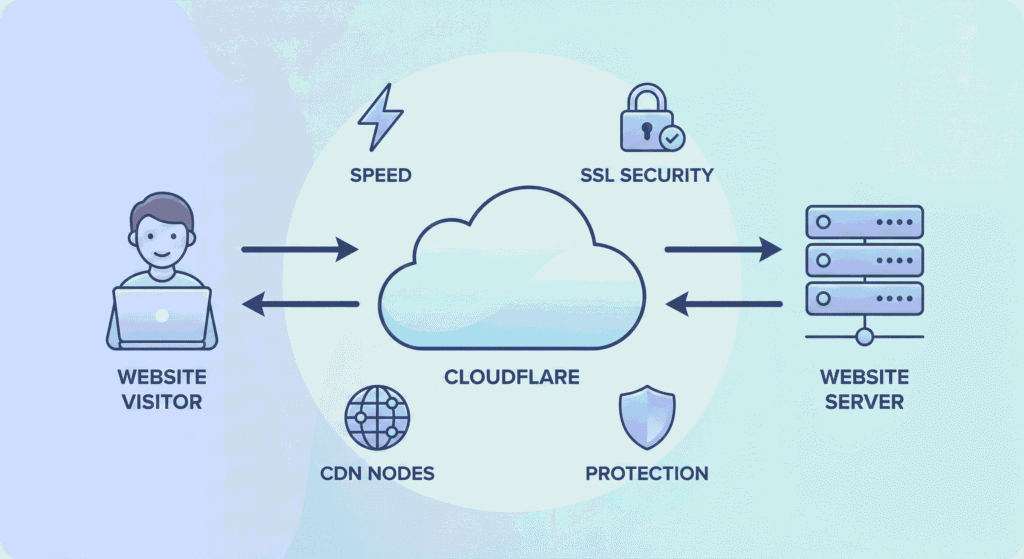
So, what exactly is Cloudflare? It’s a web performance and security platform that acts as a smart layer between your website and your visitors.
Cloudflare uses its global CDN (Content Delivery Network) with 300+ servers worldwide to deliver your content from locations closest to your users, dramatically reducing load times.
Cloudflare automatically provides free SSL certificates (essential for Google rankings), blocks malicious bots and DDoS attacks, optimizes your images and code, and improves DNS response times.
All of these happen behind the scenes without you lifting a finger.
Google’s Core Web Vitals which measure page speed, interactivity, and stability are major ranking factors for SEO. Cloudflare helps you ace these metrics effortlessly.
It’s like having an SEO assistant working 24/7 to keep your technical fundamentals in check.
How Cloudflare Impacts SEO
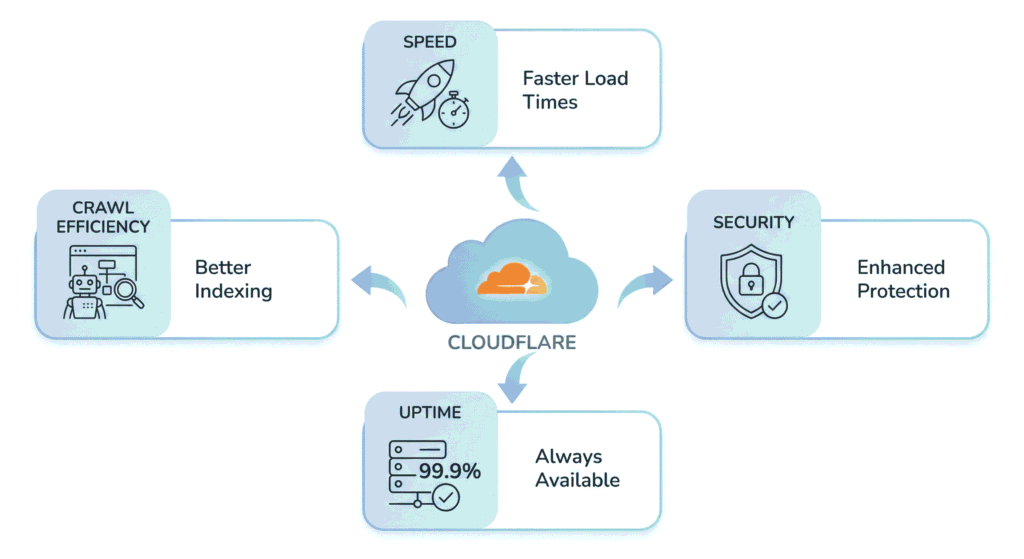
Cloudflare isn’t just a tech tool; it’s an SEO powerhouse that touches everything Google cares about. Here’s how:
It Makes Your Site Blazing Fast
Speed is a direct ranking factor, plain and simple. When your site takes forever to load, visitors bounce, and Google notices. Cloudflare fixes this by serving your content from the server closest to each visitor.
Instead of data traveling across continents, it comes from nearby, cutting off crucial seconds from your load time.
This isn’t just about keeping visitors happy (though that matters too). Faster sites score better on Google’s Core Web Vitals; metrics like page load speed and interactivity directly influence your rankings.
When you’re fast, your chances of ranking get higher. It’s that straightforward.
It Gives You Free Security
Here’s the deal: Google penalizes sites without HTTPS encryption. If you don’t have that padlock icon in your browser bar, you’re losing rankings and scaring away visitors with security warnings.
Cloudflare solves this instantly with free SSL certificates, even on its free plan. You get automatic HTTPS without the hassle or cost.
Plus, Cloudflare’s firewall protects you from hackers and malware.
If your site gets compromised, Google will blacklist you fast, so this protection shield isn’t optional; it’s essential for maintaining your rankings.
It Keeps Your Site Open 24/7
When your server crashes and your site go offline, it’s an SEO disaster. Visitors can’t access your content, and Google’s crawlers hit dead ends.
Cloudflare’s “Always Online” feature keeps cached versions of your pages accessible even when your server is down. Your site stays live, users get what they need, and search engines don’t penalize you for downtime.
Consistent uptime builds trust with Google, and trust translates to better rankings over time.
It Stops Traffic Attacks Without Breaking a Sweat
DDoS attacks are real, and they can take your site offline in minutes.
Hackers flood your server with fake traffic until it crashes, killing your uptime and your rankings in one shot.
Cloudflare automatically filters out these attacks before they reach your server by handling millions of malicious requests without you even noticing.
You protect your rankings instead of watching them tank during an attack.
It Saves Your “Crawl Budget”
Google doesn’t crawl every page on your site constantly, it allocates a “crawl budget” based on your site’s size and importance.
If you waste this budget on spambots, duplicate pages, or slow load times, Google might miss your important content updates.
Cloudflare maximizes your crawl budget by blocking bad bots, speeding up page loads with caching, and optimizing your code and images.
When Google can crawl efficiently, your new content gets indexed faster, and your pages rank better.
Technical SEO Features Inside Cloudflare You Should Use
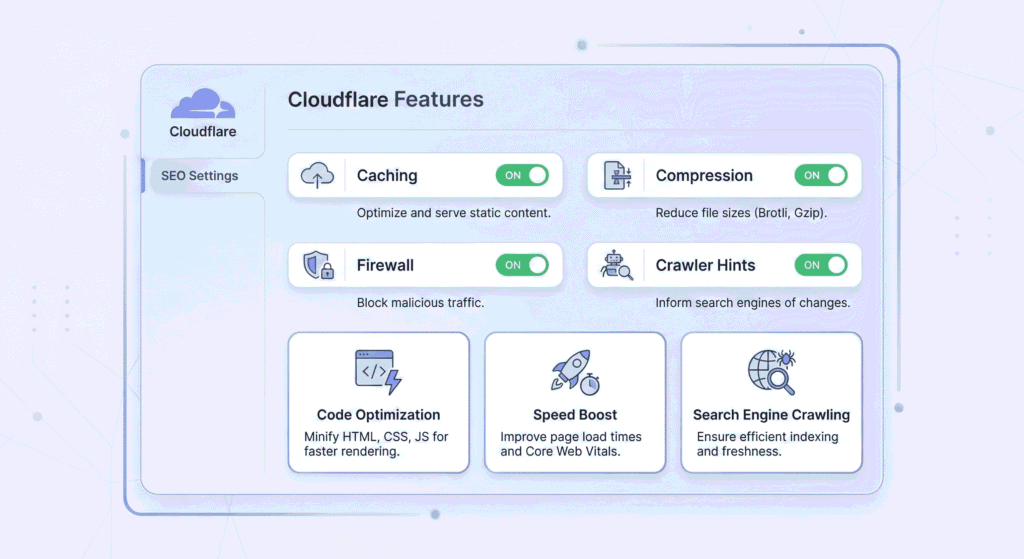
Cloudflare has some pretty cool features hiding under the hood that can seriously boost your SEO, and you don’t need to be a tech expert to use them.
Let’s look at the ones that move the needle in your rankings.
Crawler Hints: Tell Google When You Update Content
You know that frustrating feeling when you update a blog post and Google takes forever to notice? Crawler Hints fixes that.
It automatically pings search engines whenever you make changes, so they re-crawl your updated pages faster.
Think of it as tapping Google on the shoulder and saying, “Hey, I just improved this page; check it out!”
Your fresh content gets indexed quicker, which means those improvements start helping your rankings sooner rather than later.
Just enable it once, and it works on autopilot.
Auto Minify: Clean Code = Faster Loading
Your website’s code has a lot of extra fluff; spaces, comments, formatting that make it readable for developers but slow down downloading for visitors.
Auto Minify strips out all that unnecessary stuff automatically, making your files smaller and your pages faster.
It’s literally one click to turn on, and you’ll see noticeable speed improvements, especially on mobile.
Faster pages make both visitors and Google happy, which translates directly to better rankings.
Brotli Compression: Shrink File Size for Speed
Imagine packing your suitcase more efficiently; same clothes, half the space. That’s what Brotli compression does for your website files.
It squeezes them down even smaller than standard compression methods, sometimes by 15-20%.
Smaller files mean faster downloads, which means faster page loads.
Enable this in your Cloudflare settings, and your visitors get content delivered quicker without you changing a single line of code.
Faster JavaScript Loading
JavaScript is often the culprit behind slow, bulky websites. When scripts load poorly, your visitors stare at blank screens waiting for something or anything to appear.
Cloudflare’s Rocket Loader optimizes how JavaScript runs on your site. It makes sure visible content loads first while pushing non-essential scripts to the background.
Your page appears almost instantly, visitors can start reading or clicking right away, and Google sees that quick performance as a ranking signal.
Firewall Rules: Allow Googlebot, Block Bad Bots
With Cloudflare’s Firewall Rules, you can allow the good bots (like Google) while blocking the troublemakers. It’s like having a bouncer who knows exactly who gets in and who doesn’t.
This keeps your site running smoothly, protects your crawl budget, and ensures Google can efficiently index your important pages.
Setting it up is surprisingly simple; Cloudflare even has ready-made rules you can turn on with a click.
Your site stays protected, and your SEO stays strong.
Step-by-Step Cloudflare SEO Setup
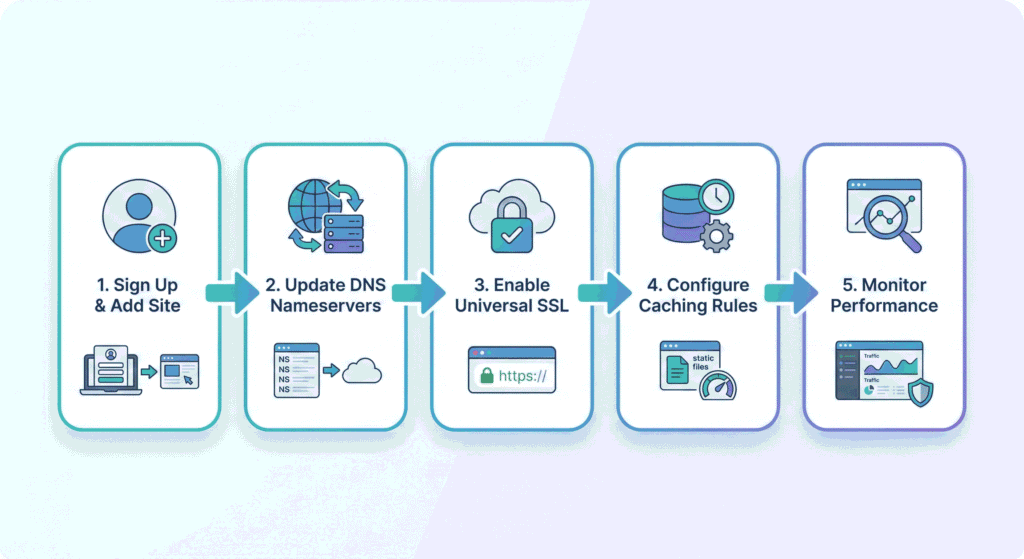
Ready to get Cloudflare working for your SEO? Don’t worry; it’s easier than you think. Just follow these simple steps, and you’ll have your site optimized in less than 30 minutes.
Step 1: Sign Up and Add Your Site
Create a free account at Cloudflare.com, click “Add a Site,” and enter your domain. Cloudflare will automatically scan your DNS records; this takes about a minute.
Step 2: Update Your Nameservers
Cloudflare gives you two nameserver addresses. Log into your domain registrar (GoDaddy, Namecheap, etc.) and replace your old nameservers with these new ones. Changes take up to 24 hours to activate, and Cloudflare will email you when it’s live.
Step 3: Turn On Key SEO Features
Enable these right away:
- Set to “Full” or “Flexible” under SSL/TLS settings for HTTPS security.
- Check HTML, CSS, and JavaScript under Speed > Optimization.
- Toggle on under Speed > Optimization.
Enable under Caching to keep your site accessible during downtime.
Step 4: Set Caching to Standard.
Under Caching > Configuration, choose “Standard” caching level. This works perfectly for most sites right away.
Step 5: Monitor Your Dashboard
Check Cloudflare’s analytics occasionally to see traffic, blocked threats, and performance metrics. Adjust settings as you get comfortable with the platform.
Measuring the SEO Impact: What to Track
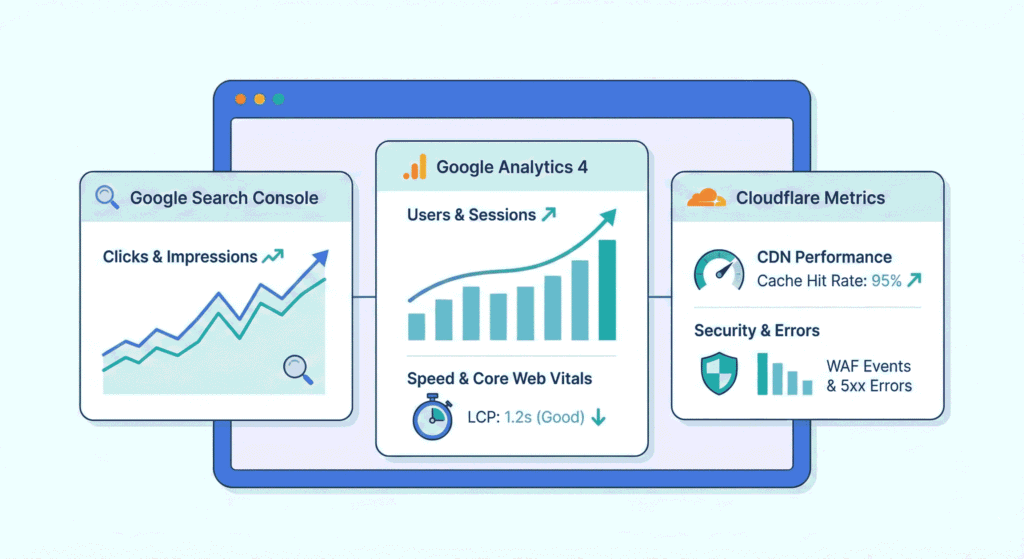
Track these metrics across three platforms to measure Cloudflare’s SEO impact.
In Google Search Console
Core Web Vitals: Monitor LCP, FID, and CLS improvements in your Performance report.
Crawl Stats: Check pages crawled daily and server response times for faster indexing.
Index Coverage: Ensure pages are indexed properly without crawler blocks.
Mobile Usability: Track reduced mobile errors and better performance scores.
In Google Analytics
Page Load Time: Check Behaviour > Site Speed for reduced load times.
Bounce Rate: Lower rates mean visitors stay longer, and Google rewards this.
Geographic Performance: Verify faster speeds for international visitors.
Conversions: Track if speed improvements boost your conversion goals.
In Cloudflare Dashboard
Bandwidth Saved: Shows caching and compression efficiency.
Threats Blocked: Confirms protection against bots and attacks.
Cache Hit Rate: Aim for 80%+ for optimal performance.
Performance Metrics: Compare speed improvements against your baseline.
Compare metrics 30-60 days before and after implementation to confirm Cloudflare is improving your SEO performance.
Advanced: Cloudflare Workers for Technical SEO

Want to take your SEO further? Cloudflare Workers are like mini programs that run before visitors reach your site, solving tricky SEO problems automatically.
What Are Cloudflare Workers?
Workers sit between your website and visitors, making quick changes to requests without slowing anything down. They’re powerful tools for handling complex SEO tasks.
Multi-Language Tags
Got a site in multiple languages? Workers automatically add the right language tags based on where visitors are from, helping Google show the correct version to each person.
Fast Redirects
Workers handle URL redirects instantly without bothering your server. Perfect when you’re moving pages around or managing hundreds of redirects at once.
Hire Cloudflare SEO Experts to Maximize Your Visibility

Setting up Cloudflare is straightforward, but optimizing it for maximum SEO impact requires real expertise; small configuration mistakes can silently hurt your rankings while everything appears to be working fine.
At Arismeta, Cloudflare optimization is handled as a performance and SEO system and not just a security tool.
Our approach includes:
- Advanced caching rule implementation
- Cloudflare Workers configuration
- Firewall fine-tuning to protect crawl budget
- Page speed optimization aligned with Core Web Vitals
- Continuous monitoring of traffic and ranking impact
Every configuration is aligned with Google’s technical SEO guidelines and performance signals.
We track measurable outcomes, including load time improvements, crawl efficiency, and ranking growth and adjust based on data.
Conclusion: Is Cloudflare Worth for SEO?
Short answer: Yes.
Cloudflare improves three core Google ranking signals:
- Page speed
- Security
- Server reliability
Faster load times improve user experience and Core Web Vitals.
Stronger security builds trust signals.
Reliable uptime prevents ranking drops caused by downtime.
Cloudflare’s free plan offers:
- CDN acceleration
- Basic DDoS protection
- Automatic performance improvements
Setup typically takes under 30 minutes. Most features operate automatically once configured.
For bloggers, ecommerce sites, and business websites, Cloudflare provides enterprise-level infrastructure at minimal cost.
When configured strategically, Cloudflare becomes an SEO performance multiplier and not just a security layer.
FAQs
1. Does Cloudflare help with SEO?
Yes. Cloudflare makes your site faster and more secure, which are both ranking factors Google cares about. Faster, safer sites rank higher.
2. Is Cloudflare free?
Yes. The free plan includes CDN, SSL, security features, and performance tools, plenty for most websites to see real SEO improvements.
3. Does Cloudflare work with WordPress?
Yes, perfectly. There’s even an official plugin that makes setup super easy from your WordPress dashboard.
4. Will it slow down my site?
No, it makes it faster. Cloudflare serves your content from nearby servers, reducing load times for everyone.
5. Does it help mobile SEO?
Absolutely. Cloudflare improves mobile speed through compression and optimization, which boosts your mobile rankings.
